
 400-188-1518
10 Best Jira Alternatives in 2026: From Lean Teams to Enterprise Scale
Switching from Jira? We’ve evaluated ten platforms that teams actually adopt in 2026. This guide covers ONES, monday.com, ClickUp, Asana, Linear, Shortcut, Trello, Wrike, Notion, Azure DevOps, and GitLab — ranked by fit for different organizational contexts, not just feature count.
Each recommendation draws from migration patterns across 110+ teams. We focus on adoption speed, real total cost, and where each tool genuinely excels versus where marketing glosses over friction.
Table of Contents
Quick Verdict: Three Standout Options for 2026
| Platform | Ideal Context | Entry Price | Rating |
|---|---|---|---|
| ONES | Mid-to-large engineering organizations needing unified R&D governance | Custom (enterprise) | ★★★★★ |
| monday.com | Cross-functional teams prioritizing visual workflows and rapid rollout | Free (2 seats); $12/user/mo | ★★★★★ |
| Linear | Product-driven software teams seeking minimal process overhead | $8/user/mo | ★★★★½ |
Most organizations: monday.com delivers the fastest path to broad adoption. Pure engineering teams: Linear or ONES (at scale). Tool consolidation: ClickUp, with adoption caveats.
Why Organizations Move Beyond Jira
Jira dominates software development tracking, yet retention data reveals consistent departure triggers. The platform’s architecture serves a specific use case well; expansion beyond it generates friction.
| Pain Point | Operational Impact | Most Affected |
|---|---|---|
| Extended onboarding | 2–4 weeks to productive use for new members | Non-technical departments |
| Administrative burden | Custom fields, workflows, schemes require dedicated expertise | Teams without platform admins |
| Departmental mismatch | Issue types and terminology assume engineering context | Marketing, sales, operations |
| Interface density | Excessive options overwhelm occasional users | First-time PM tool adopters |
| Escalating cost structure | Premium tier ($16/user) plus SSO, roadmapping, time tracking add-ons | Growing teams (15–50 members) |
| View limitations | Timeline, resource, and portfolio views require additional modules | Program and project managers |
| Performance degradation | Latency increases with issue volume and customization depth | Large instances (1000+ issues) |
| Capability overshoot | Complexity exceeds needs for basic task coordination | Startups, freelancers, small agencies |
Case: A 40-person SaaS company reported active Jira usage confined to 8 engineers after six months. Marketing and customer success abandoned the platform for spreadsheets and Slack. Post-migration to a visual alternative, 38 of 40 staff engaged within two weeks.
Capability Comparison: Jira Against Primary Alternatives
| Dimension | Jira | ONES | monday.com | ClickUp | Linear | Asana |
|---|---|---|---|---|---|---|
| Onboarding Duration | 2–4 weeks | 1–2 weeks | 2–5 days | 1 week | 1–3 days | 3–7 days |
| Free Tier Scope | 10 users | Not applicable | 2 users, 3 boards | Unlimited users | None | 15 users |
| Base Paid Price | $8.15/user/mo | Custom | $12/user/mo | $7/user/mo | $8/user/mo | $10.99/user/mo |
| Available Views | 6 | 8+ | 10+ | 15+ | 5 | 8+ |
| Native Time Tracking | Requires add-on | Built-in | Pro tier and above | All paid plans | Not available | Integration-dependent |
| Integrated Documentation | Requires Confluence | Native knowledge base | Built-in | Built-in | Not available | Not available |
| Agile Ceremony Support | Extensive | Strong (customizable) | Basic | Basic | Sprint/cycle native | Limited |
| Cross-Department Fit | Engineering-centric | Engineering + adjacent teams | Designed for all | All teams | Engineering only | All teams |
| Mobile Experience | 3.8/5 | 4.5/5 | 4.7/5 | 4.5/5 | 4.8/5 | 4.6/5 |
| Integration Ecosystem | 3000+ marketplace | 200+ native | 200+ native | 1000+ | 50+ | 200+ |
Annual Cost Projection: 50-Person Team
| Platform | Entry Tier | Recommended Tier | Annual Expenditure |
|---|---|---|---|
| Jira | Standard: $8.15/user | Premium: $16/user | $9,600 |
| ONES | Custom | Custom | Variable (enterprise) |
| monday.com | Basic: $12/user | Standard: $14/user | $8,400 |
| ClickUp | Unlimited: $7/user | Business: $12/user | $7,200 |
| Asana | Starter: $10.99/user | Advanced: $24.99/user | $14,994 |
| Linear | Standard: $8/user | Standard: $8/user | $4,800 |
Cost note: Jira’s base rate understates reality. SSO (Atlassian Access: +$3.50/user), time tracking (Tempo: ~$5/user), and portfolio roadmapping (Premium-only) push functional costs to $12–16/user.
1. ONES — Best for Enterprise R&D Governance
ONES occupies a distinct position among Jira alternatives: built specifically for organizations where software delivery is core to business outcomes and coordination complexity scales with headcount. Unlike generalist platforms that accommodate engineering as one of many use cases, ONES constructs an integrated environment spanning project management, requirements traceability, knowledge management, test coverage, CI/CD pipelines, and code repository integration.
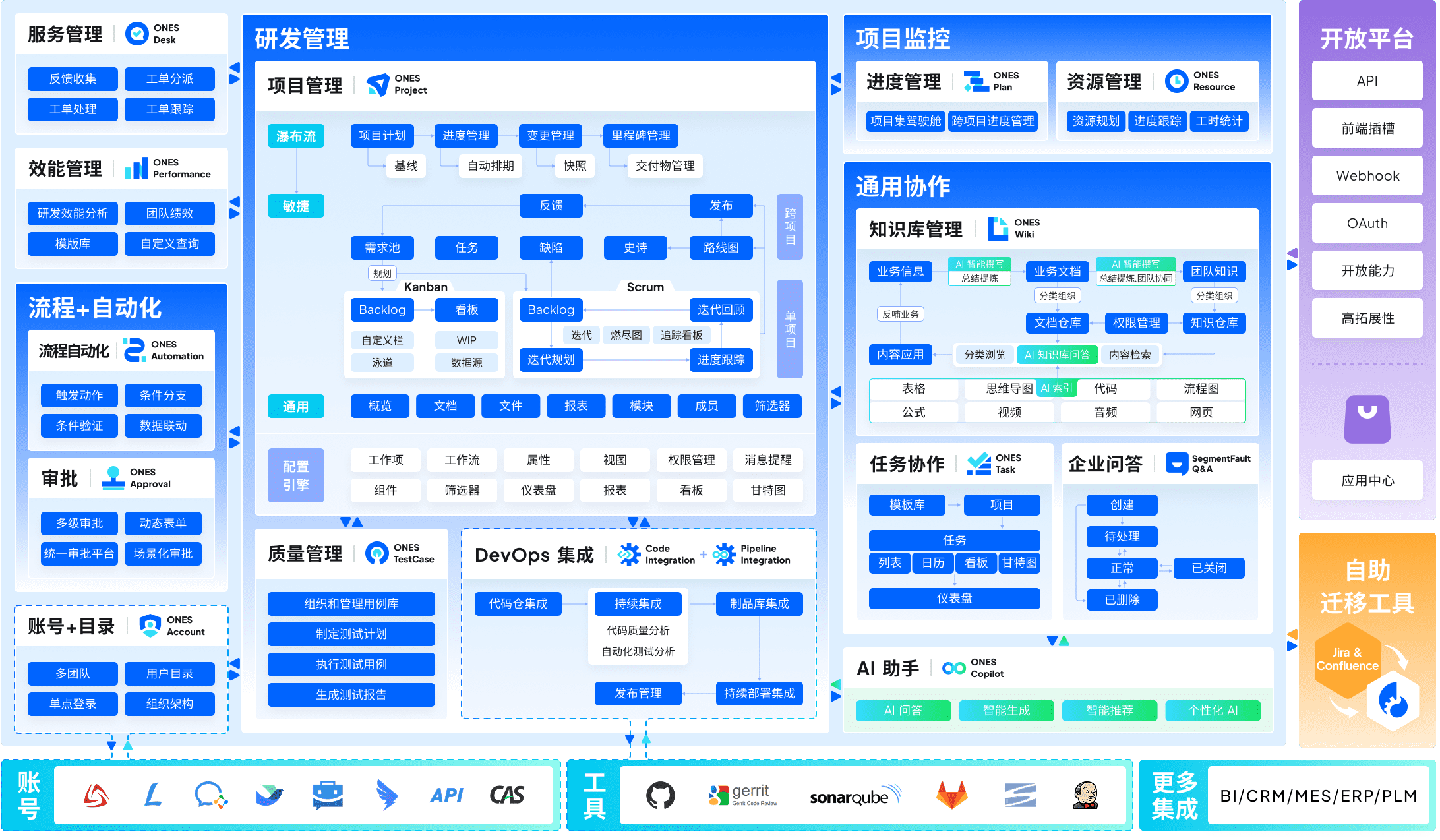
The platform’s architecture addresses a failure mode common in large Jira deployments: tool fragmentation. Teams frequently operate Jira for issues, Confluence for docs, separate test management, yet another CI dashboard, and spreadsheets for cross-program visibility. ONES consolidates these into a single data model with unified permissions and reporting.
Core Differentiators
| Capability | Implementation |
|---|---|
| End-to-end integration | Project, requirement, test, pipeline, and code management within one system |
| Organizational scale | Complex workflow configuration, granular permission matrices, cross-team dependency mapping |
| Engineering intelligence | Native metrics for delivery velocity, quality trends, and efficiency — supporting data-driven improvement cycles |
Ideal for: Technology organizations with 100+ R&D staff, multiple product lines, compliance requirements, or matrixed team structures where coordination overhead directly impacts release predictability.
Considerations: Implementation investment exceeds plug-and-play alternatives. Configuration aligns with organizational process maturity; teams without established delivery practices may underutilize depth.
2. monday.com — Best General-Purpose Alternative
monday.com succeeds where Jira stalls: translating project management into visually intuitive structures. Color-coded boards, drag-and-drop automation building, and template-driven setup reduce activation energy for non-technical participants.
Pricing Structure
| Plan | Price | Notable Inclusions |
|---|---|---|
| Free | $0 (2 users, 3 boards) | 200+ templates, unlimited documents, mobile access |
| Basic | $12/user/mo | Unlimited items, 5GB storage, 250 automations/month, single-board dashboard |
| Standard | $14/user/mo | Timeline, Gantt, Calendar, 25,000 automations, guest access, 5-board dashboard |
| Pro | $24/user/mo | Time tracking, formula columns, private boards, dependency visualization, 10-board dashboard |
| Enterprise | Custom | Advanced security, HIPAA, analytics, hierarchical permissions, 99.9% SLA |
Strengths
- Rapid team activation: Non-technical users productive within days
- Visual diversity: Kanban, Timeline, Gantt, Map, Workload, Chart, Calendar views
- Departmental breadth: Marketing, sales, HR, operations, and engineering coexist
- Resource visibility: Time tracking and workload distribution at Pro tier
- Mobile quality: 4.7/5 iOS rating supports distributed work
- Automation accessibility: 25,000 actions/month on Standard without code
Limitations
- Integration count (200+ native) trails Jira’s marketplace depth
- Advanced reporting gated to Pro tier
- Entry automation quotas (250/month) constrain moderate workflows
- Pro pricing ($24/user) accumulates for larger rosters
- Agile ceremony support basic compared to engineering-native tools
Verdict: monday.com wins for organizations where adoption breadth matters more than engineering-specific depth. Jira retains advantage for teams deeply invested in scrum customization.
Best fit: Marketing agencies, SaaS cross-functional teams, creative operations, and organizations standardizing on one platform.
3. ClickUp — Best for Tool Consolidation
ClickUp pursues an expansive vision: one platform replacing task trackers, document editors, goal systems, time logs, and communication channels. This breadth attracts teams fatigued by application switching, though it introduces complexity that demands deliberate rollout.
Pricing Structure
| Plan | Price | Notable Inclusions |
|---|---|---|
| Free | $0 (unlimited users) | 100MB storage, unlimited tasks, 2FA, collaborative docs, 100 automations |
| Unlimited | $7/user/mo | Unlimited storage, integrations, dashboards, Gantt, goals, 1,000 automations |
| Business | $12/user/mo | Google SSO, advanced automations, timelines, workload, custom exports, 10,000 automations |
| Enterprise | Custom | White labeling, enterprise API, advanced permissions, dedicated success manager, unlimited automations |
Strengths
- Unrestricted free tier: No user caps for evaluation
- View density: List, Board, Gantt, Calendar, Timeline, Mind Map, Workload, Map, and additional configurations
- Customization depth: Fields, statuses, automations, dashboards adaptable to varied methodologies
- Price competitiveness: $7/user entry point for substantial capability
- Automation sophistication: Multi-step logic without development resources
- Native time tracking: Included across all paid tiers
Limitations
- Feature abundance overwhelms initial users; phased introduction recommended
- Performance varies with workspace scale; archiving discipline required
- Mobile implementation incomplete for advanced functions
- Interface density exceeds minimalist alternatives
- Update frequency disrupts established workflows
Verdict: ClickUp rewards teams with capacity to design and enforce adoption patterns. Without governance, feature sprawl undermines the consolidation benefit.
Best fit: Operations teams seeking to retire multiple subscriptions, startups with diverse workflow needs, and organizations with internal change management capacity.
4. Asana — Best for Marketing and Creative Operations
Asana balances structure with accessibility, emphasizing timeline clarity and stakeholder communication over engineering ceremony support. The platform’s design language resonates with teams managing campaigns, content production, and client deliverables.
Pricing Structure
| Plan | Price | Notable Inclusions |
|---|---|---|
| Basic | $0 (15 users) | Unlimited tasks, projects, messages, activity log, 100MB attachment limit |
| Starter | $10.99/user/mo | Timeline, custom fields, 1,000 automations, reporting dashboards |
| Advanced | $24.99/user/mo | Goals, portfolios, workload, time tracking, proofing, 25,000 automations |
| Enterprise | Custom | Advanced admin, data export, attachment controls, 99.9% SLA |
Strengths
- Timeline and portfolio views native for program visibility
- Proofing functionality for creative review cycles
- Goal alignment connecting daily tasks to strategic objectives
- Intuitive enough for client collaboration without training
- Reliable performance at moderate scale
Limitations
- Agile support superficial; no sprint management depth
- Time tracking requires Advanced tier
- Cost escalates rapidly for full feature access
- Integration ecosystem narrower than engineering-focused platforms
Verdict: Asana outperforms for creative workflow orchestration. Engineering teams should evaluate alternatives with sprint-native capabilities.
Best fit: Marketing departments, creative agencies, brand teams, and program managers coordinating cross-functional initiatives without deep technical requirements.
5. Linear — Best for Modern Software Product Teams
Linear occupies the opposite end of the spectrum from ClickUp: radical restraint. The platform serves teams that view process overhead as impediment, offering opinionated workflows optimized for speed rather than configurability.
Pricing Structure
| Plan | Price | Notable Inclusions |
|---|---|---|
| Free | Not offered | N/A |
| Standard | $8/user/mo | Unlimited issues, cycles, roadmaps, Git integration, API access |
| Plus | $14/user/mo | Advanced analytics, SLAs, priority support, custom workflows |
| Enterprise | Custom | SSO, audit logs, SCIM, dedicated support, security reviews |
Strengths
- Minimal onboarding: Productive use within 1–3 days
- Keyboard-centric design: Navigation efficiency for power users
- Git-native integration: Automatic issue linking and branch correlation
- Performance: Consistent speed regardless of issue volume
- Aesthetic coherence: Reduced cognitive load through visual consistency
- Cycle-based planning: Native support for time-boxed iteration
Limitations
- No free tier; evaluation requires commitment
- Non-engineering teams find functionality and terminology alienating
- View options deliberately limited (5 types)
- Automation scope narrow compared to generalist platforms
- Reporting depth requires Plus tier
Verdict: Linear excels where engineering culture prioritizes velocity over visibility to other departments. Cross-functional coordination demands supplementary tooling.
Best fit: Seed-to-Series B software companies, product-engineering teams with established agile maturity, and organizations where developer experience directly correlates with retention.
6. Shortcut — Best for Agile Development Teams
Shortcut (formerly Clubhouse) occupies a middle position between Linear’s minimalism and Jira’s expansiveness. The platform maintains sprint-centric structures while reducing administrative overhead.
Pricing Structure
| Plan | Price | Notable Inclusions |
|---|---|---|
| Free | $0 (up to 10 users) | Unlimited projects, basic reporting, 1,000 stories |
| Team | $8.50/user/mo | Unlimited stories, advanced reporting, integrations, priority support |
| Business | Custom | SSO, advanced permissions, dedicated success manager |
Strengths
- Story-centric terminology familiar to agile practitioners
- Iteration and milestone planning without complex configuration
- Git integration for automatic progress updates
- Performance predictability at scale
- Free tier accommodates small team evaluation
Limitations
- Non-software teams experience friction with domain-specific language
- Reporting customization limited compared to enterprise platforms
- Integration ecosystem modest
- Mobile experience secondary to desktop design
Verdict: Shortcut suits teams wanting agile structure without Jira’s administrative demands. Enterprise governance requirements may exceed its design scope.
Best fit: Software teams of 10–50 practicing scrum or kanban, agencies with development practices, and organizations transitioning from Jira seeking reduced complexity.
7. Trello — Best for Simple Kanban Coordination
Trello, also Atlassian-owned, represents the stripped-down extreme: card-based boards with minimal process prescription. Its value lies in immediate accessibility rather than methodological support.
Pricing Structure
| Plan | Price | Notable Inclusions |
|---|---|---|
| Free | $0 (unlimited users) | 10 boards, unlimited cards, basic integrations, 2FA |
| Standard | $5/user/mo | Unlimited boards, advanced checklists, custom fields, 1,000 automations |
| Premium | $10/user/mo | Multiple views (Timeline, Dashboard, Map), workspace templates, 2,000 automations |
| Enterprise | $17.50/user/mo | Advanced security, admin controls, unlimited automations, priority support |
Strengths
- Immediate comprehension: No training required for basic use
- Visual simplicity: Board metaphor universally understood
- Power-Up ecosystem: Modular extension for specific needs
- Price accessibility: Lowest entry point among major alternatives
- Atlassian integration: Confluence and Jira connectivity for hybrid environments
Limitations
- Scaling friction: Board proliferation creates visibility fragmentation
- Reporting absent: No native analytics or progress measurement
- Dependency management: No built-in task relationship tracking
- Enterprise governance: Permission and audit capabilities minimal
- Power-Up dependency: Core functionality requires third-party extensions
Verdict: Trello serves transient or simple coordination needs. Permanent teams outgrow its structure within 6–18 months typically.
Best fit: Freelancers, small project teams, personal productivity, event planning, and temporary initiative tracking.
8. Wrike — Best for Enterprise Project Management
Wrike targets organizations where project management is a formal discipline with governance requirements, resource allocation complexity, and executive reporting obligations.
Pricing Structure
| Plan | Price | Notable Inclusions |
|---|---|---|
| Free | $0 (limited features) | Task management, file sharing, basic integrations |
| Team | $9.80/user/mo | Custom workflows, interactive Gantt, 2GB storage, shareable dashboards |
| Business | $24.80/user/mo | Resource management, time tracking, workload charts, proofing, 5GB storage |
| Enterprise | Custom | Advanced security, user audits, automated workflows, 10GB+ storage, dedicated support |
Strengths
- Resource management: Native workload balancing and capacity planning
- Executive visibility: Program and portfolio rollup reporting
- Customization depth: Request forms, approval workflows, project blueprints
- Enterprise security: SOC 2, GDPR, HIPAA compliance options
- Integration breadth: 400+ connectors including ERP and CRM systems
Limitations
- Interface complexity exceeds consumer-grade alternatives
- Activation period extends to 2–3 weeks for full configuration
- Cost structure prohibitive for smaller teams
- Mobile experience secondary to desktop capabilities
- Agile ceremony support superficial
Verdict: Wrike justifies investment where project management is centralized function with formal methodology. Casual or engineering-native teams find overhead excessive.
Best fit: Professional services firms, marketing departments with 50+ staff, organizations with PMO functions, and regulated industries requiring audit trails.
9. Notion — Best for Documentation with Light Project Tracking
Notion inverts the typical project tool hierarchy: documents and databases are primary, with project views as derivative presentations. This serves knowledge-intensive teams where context lives in written form.
Pricing Structure
| Plan | Price | Notable Inclusions |
|---|---|---|
| Free | $0 (personal use) | Unlimited pages, blocks, file uploads (5MB limit), 7-day page history |
| Plus | $8/user/mo | Unlimited file uploads, 30-day history, 100 guests |
| Business | $15/user/mo | SAML SSO, private teamspaces, 90-day history, 250 guests, bulk PDF export |
| Enterprise | Custom | Advanced security, audit logs, SCIM, unlimited history, dedicated success manager |
Strengths
- Knowledge-project integration: Context and execution in one environment
- Database flexibility: Custom properties, relations, rollups for varied tracking needs
- Template community: Extensive pre-built configurations
- Collaborative editing: Real-time document co-creation
- Price accessibility: Plus tier competitive for documentation-heavy teams
Limitations
- Project management depth inferior to dedicated platforms
- Performance degradation with large databases
- Learning curve for database and relation concepts
- Mobile experience constrained
- No native time tracking or resource management
Verdict: Notion succeeds as knowledge base with project awareness, not project system with documentation. Teams requiring either exclusively should evaluate specialized tools.
Best fit: Content teams, research organizations, startups building operating manuals, and teams where documentation is continuous deliverable.
10. Azure DevOps — Best for Microsoft-Centric Enterprises
Azure DevOps extends Microsoft’s development ecosystem into project tracking, providing native integration with Visual Studio, Azure services, and Active Directory infrastructure.
Pricing Structure
| Component | Price | Notable Inclusions |
|---|---|---|
| Basic | $6/user/mo | Agile tools, repos, build pipelines, test plans (limited) |
| Basic + Test Plans | $52/user/mo | Full test management, advanced analytics |
| Azure DevOps Server | Custom licensing | On-premises deployment option |
Additional costs: Build minutes, artifact storage, and parallel jobs scale with usage.
Strengths
- Microsoft ecosystem coherence: Single sign-on, familiar interface patterns
- Repository integration: Native Git and TFVC support with work item linking
- CI/CD pipeline integration: Build and release orchestration alongside planning
- Enterprise deployment: Cloud and on-premises options
- Customizability: Process templates adaptable to organizational standards
Limitations
- Non-technical adoption friction: Interface assumes development familiarity
- Cross-departmental use limited: Engineering-centric design
- Mobile experience minimal
- Configuration complexity for advanced customizations
- Vendor lock-in risk for deep Azure integration
Verdict: Azure DevOps is optimal where Microsoft infrastructure is already strategic commitment. Diversified or cloud-agnostic environments should evaluate alternatives.
Best fit: .NET development teams, organizations with Azure cloud strategy, and enterprises with existing Microsoft licensing agreements.
11. GitLab — Best for DevOps-Native Teams
GitLab extends version control into complete DevOps lifecycle management, with project tracking as one component of a broader engineering platform.
Pricing Structure
| Plan | Price | Notable Inclusions |
|---|---|---|
| Free | $0 (unlimited users) | Unlimited public/private repos, CI/CD (400 minutes/month), issue tracking, merge requests |
| Premium | $19/user/mo | Advanced CI/CD, code review, security scanning, release orchestration, 10,000 minutes |
| Ultimate | $99/user/mo | Security dashboards, compliance pipelines, value stream analytics, 50,000 minutes |
Strengths
- Single application: Code, CI/CD, security, and planning unified
- Issue-milestone integration: Planning directly connected to delivery
- Merge request workflow: Code review and approval gates
- Self-hosted option: Complete data sovereignty control
- Open source core: Transparency and community extension
Limitations
- Project management features secondary to engineering tools
- Non-technical teams find interface and terminology exclusionary
- Ultimate tier pricing substantial for analytics access
- Performance self-hosting requires operational expertise
- Issue tracking less flexible than dedicated PM platforms
Verdict: GitLab suits engineering organizations wanting planning integrated with delivery infrastructure. Business teams require separate tooling.
Best fit: Software teams practicing GitOps, organizations prioritizing supply chain security, and companies wanting to consolidate DevOps toolchain.
Decision Framework: Selecting Your Alternative
Platform selection should follow organizational diagnosis, not feature comparison alone. Consider these determinants:
| Question | If Yes, Consider | If No, Consider |
|---|---|---|
| Is engineering our primary user base? | Linear, GitLab, Azure DevOps, ONES | monday.com, Asana, Notion |
| Do we need cross-departmental standardization? | monday.com, ONES, Wrike | Linear, Trello, GitLab |
| Is tool consolidation a strategic priority? | ClickUp, ONES, GitLab | Best-of-breed combination |
| Do we have dedicated platform administration? | Jira, Azure DevOps, Wrike, ONES | monday.com, Linear, Trello |
| Is visual simplicity paramount? | monday.com, Trello, Linear | ClickUp, Azure DevOps, Wrike |
| Do compliance requirements govern selection? | ONES, Wrike, GitLab Ultimate | Linear, Trello, Notion |
| Is our team sub-15 people? | Trello, Notion, ClickUp Free | Enterprise-oriented platforms |
| Do we measure engineering productivity formally? | ONES, Linear, GitLab Ultimate | Generalist platforms |
Frequently Asked Questions
Which alternative offers the fastest team adoption?
Trello and monday.com consistently show shortest time-to-productivity. Trello requires essentially no training; monday.com’s visual design enables non-technical users within 2–5 days. Linear achieves similar speed for engineering audiences familiar with keyboard-centric tools.
What is the most cost-effective option for growing teams?
ClickUp’s Unlimited tier ($7/user) provides substantial capability at lowest entry point. Linear ($8/user) follows for engineering-specific needs. However, total cost includes adoption support, integration development, and potential future migration — not merely subscription fees.
Can any alternative fully replicate Jira’s agile depth?
No platform matches Jira’s scrum and kanban configurability for complex enterprise agile. ONES approaches closest for large-scale R&D governance. Linear and Shortcut offer refined opinionated workflows that many teams prefer to Jira’s configurability burden. The question is whether your agility benefits from that depth.
How should organizations evaluate migration effort?
Migration complexity correlates with customization depth and data volume. Jira instances with extensive custom fields, workflows, and issue history require dedicated planning. Tools like monday.com and ClickUp offer import assistants; ONES and enterprise platforms typically include migration services in implementation. Budget 2–8 weeks for functional migration, longer for cultural adaptation.
Is remaining with Jira ever the correct choice?
Organizations with mature agile practice, substantial Atlassian ecosystem investment, dedicated administrative resources, and engineering-centric user bases may find migration cost exceeds benefit. The decisive factor is whether Jira’s limitations constrain organizational capabilities rather than merely causing inconvenience.
Conclusion
The Jira alternative landscape in 2026 offers genuine segmentation rather than undifferentiated competition. ONES addresses enterprise R&D governance complexity. monday.com maximizes cross-functional adoption. Linear optimizes engineering velocity. ClickUp enables broad consolidation. Each serves distinct organizational contexts.
Selection succeeds when aligned with operational reality: team composition, technical maturity, growth trajectory, and existing infrastructure. The platforms evaluated here represent viable paths forward; the appropriate choice depends on which constraints your organization most urgently needs to resolve.